1. To get access to VPN, this must be ordered by your immediate manager through the portal (https://support.tenstarsimulation.com)
2. Go to https://vpn.tenstarsimulation.com:446/
3. Click on “Sign in via SAML”
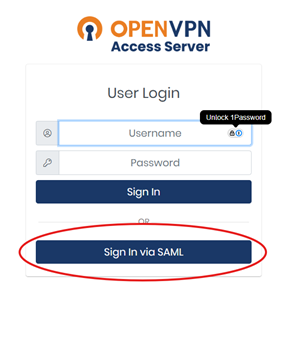
4. A new login page will open.
5. Log in with Your first name.lastname@tenstarsimulation.com
6. Enter the password for your account (Same as for your computer)
7. Verify with Authenticator on your phone if necessary.
8. Select the platform you are using.
9. On Windows, it will be displayed that the file is not signed, but choose to download it anyway
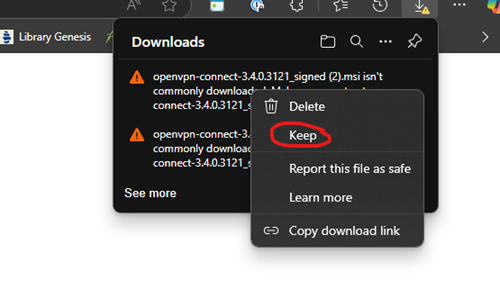
10. Open the file you downloaded and install.
11. Start Open VPN connect and click on the connect button.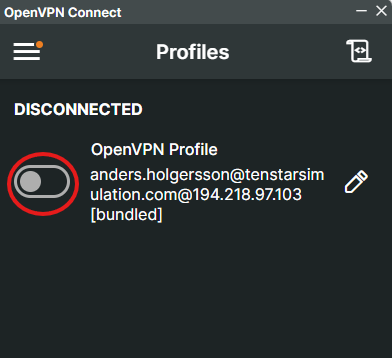
12. You will now be prompted to log in to Microsoft again with MFA to connect.
(You have to do this every time)
Was this article helpful?
That’s Great!
Thank you for your feedback
Sorry! We couldn't be helpful
Thank you for your feedback
Feedback sent
We appreciate your effort and will try to fix the article